Here is the full English translation of your article, polished and structured:
How to Choose a SIM Card for a Security Camera
With the growing popularity of connected security cameras, especially 4G and 5G models, choosing the right SIM card has become essential to ensure reliable performance. Unlike a smartphone, a security camera has very specific requirements in terms of network, data usage, and connection stability.
Choosing the right SIM card is not just about picking any mobile plan. It requires finding the right balance between technical compatibility, network coverage, data volume, and cost. Here is a complete guide to help you make the right choice.
Understanding Your Camera’s Compatibility
Before anything else, it is crucial to check your camera’s technical specifications. Not all SIM cards are compatible with every device.
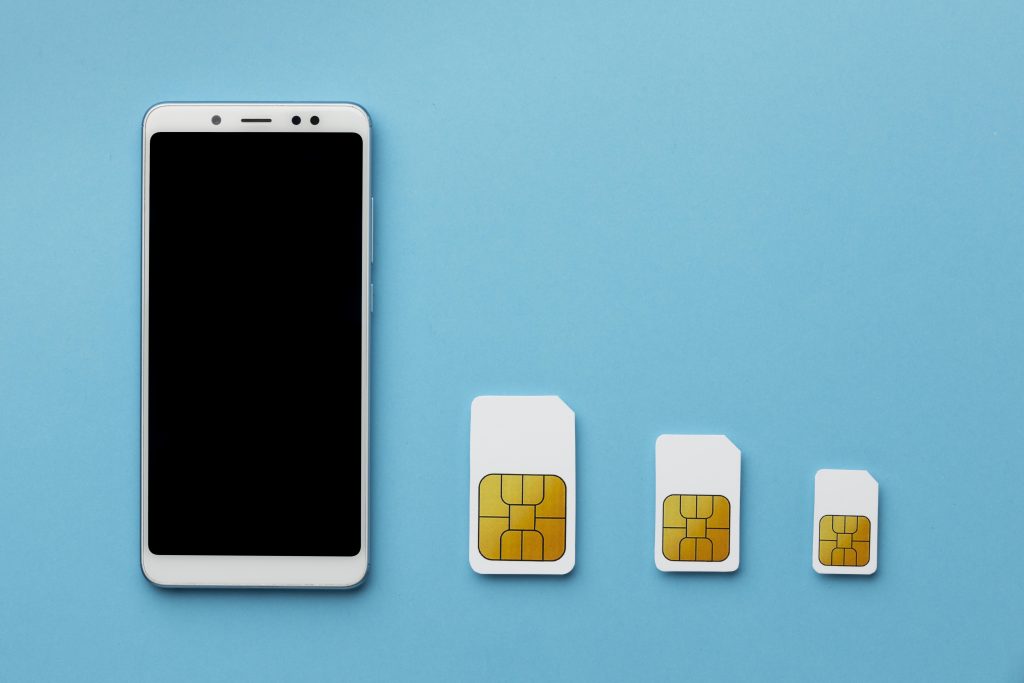
The first thing to verify is the SIM card format. Most modern cameras use a nano SIM, while some older models may still require a micro SIM. Although adapters exist, it is always better to use the format recommended by the manufacturer to avoid connectivity issues.
Next, look at the supported network technologies. Some cameras operate only on 4G LTE, while others may still support 3G or even 2G. In 2026, 3G networks are being phased out in many countries, making 4G the minimum requirement, with 5G recommended for high-demand usage.
Frequency bands are another critical and often overlooked factor. A camera may support 4G but still fail to work properly if it does not match the frequency bands used by local carriers. Always verify this compatibility before purchasing a SIM card.
Finally, some cameras rely on specific technologies such as NB-IoT or LTE-M, which are designed for low-power connected devices. In such cases, a standard SIM card may not work, and you will need a dedicated IoT SIM plan.
Choosing the Right Network for Your Location
Network quality is a key factor for any security camera. An unstable connection can lead to missed alerts, delays, or lost footage.
Your choice of carrier should primarily depend on real coverage at the camera’s location. Instead of relying on marketing claims, check official coverage maps and real-world user feedback.
In rural or remote areas, it is often best to choose a carrier known for strong coverage. Alternatively, multi-network SIM cards (commonly used in IoT) can automatically switch between operators to maintain the best available signal.
If your camera is mobile, such as in a vehicle or used across multiple sites, consider a roaming-enabled SIM or an eSIM that allows remote carrier switching.
Matching Your Plan to Data Usage
Not all security cameras consume the same amount of data. Choosing the right plan depends entirely on how you use your camera.
For basic use, such as motion alerts and occasional image uploads, data consumption is very low. A small plan with a few megabytes per month may be sufficient, especially with IoT solutions.
For moderate use, including periodic image uploads or short video clips, a plan between 1 GB and 5 GB per month is usually appropriate. This provides enough flexibility without risking overage charges.
For heavy use, such as continuous video streaming or full-length video uploads, data needs increase significantly. In this case, a high-volume or unlimited plan is required. However, be careful: some “unlimited” plans may include restrictions, throttling, or limitations for non-smartphone devices.
Consumer SIM vs IoT SIM: Which One to Choose?
The type of SIM card you choose plays a major role in performance and reliability.
Consumer SIM cards are widely available and affordable. They are suitable for simple home setups with a single camera and basic monitoring needs. However, they may lack stability and advanced network features.
IoT or M2M SIM cards are specifically designed for connected devices. They offer better reliability, advanced options such as static IP addresses, private APNs, and remote device management tools. These are ideal for professional installations or multi-camera deployments.
eSIM technology is another option worth considering. Built directly into the device, it allows remote provisioning and carrier switching without physical access. This is especially useful for cameras installed in hard-to-reach locations.
Remote Access and Network Limitations
One often overlooked aspect is remote access to your camera.
Most consumer mobile plans use CGNAT, which prevents direct inbound connections to the device. This means you cannot access your camera directly via a public IP address.
There are two main ways to overcome this limitation. The first is to use the manufacturer’s cloud service, which acts as an intermediary. This is the simplest solution for home users.
The second is to use a SIM card that provides a public or static IP, or supports VPN access. This is typically available with IoT SIM plans and is better suited for advanced or professional setups.
Power Consumption and Battery Life
For battery-powered cameras, the SIM card and network type can significantly impact autonomy.
Technologies such as NB-IoT and LTE-M are designed to reduce energy consumption. They allow the device to remain in low-power mode and transmit data only when necessary.
Additionally, some SIM cards support advanced power-saving features, which can greatly extend battery life in remote deployments.
Security and Data Management
Security is a critical concern when dealing with connected cameras, especially when transmitting sensitive video footage.
It is advisable to choose a provider that offers advanced security features such as SIM locking, remote management, and usage alerts.
IoT solutions often include private networks and VPN access, providing an additional layer of protection for data transmission.
Managing Costs Effectively
Cost control is another important factor when choosing a SIM card.
Make sure to review plan details carefully, including data limits, overage charges, roaming fees, and any hidden restrictions. Some plans include alerts or automatic limits to prevent unexpected bills.
If you are managing multiple cameras, pooled data plans can be a cost-effective solution, allowing several devices to share a single data allowance.
Common Mistakes to Avoid
Several common mistakes can lead to poor performance or unexpected costs.
One of the most frequent errors is choosing a standard mobile plan expecting full compatibility with a security camera, including features like public IP access. In reality, most consumer plans use CGNAT.
Another mistake is ignoring frequency band compatibility, which can result in the camera failing to connect properly.
Finally, underestimating data usage can lead to excessive charges, especially if the camera occasionally uploads large video files.
Conclusion
Choosing a SIM card for a security camera requires careful consideration. You need to ensure compatibility with the device, select a network with strong coverage, and choose a data plan that matches your usage.
For basic home use, a standard consumer SIM card may be sufficient. For more demanding or professional applications, IoT SIM cards or eSIM solutions provide better reliability, flexibility, and control.
In all cases, testing your setup in real conditions before full deployment is highly recommended. A security camera is only effective if its connection is stable, secure, and suited to its environment.