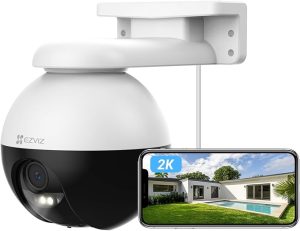
Review of the eufy Security Indoor Cam 2K
After several weeks, I’m sharing my impressions of the eufy Security Indoor Cam 2K. This
indoor camera impressed me with its performance and features.
My user experience and impressions
Installing the eufy Security Indoor Cam 2K was easy. This is a plus for those who aren’t very technical. The
2K image quality is incredible, allowing me to clearly see my space.
The real-time alerts are accurate. I feel safe knowing my home is monitored from everywhere.
Comparison with other security cameras
The eufy Security Indoor Cam 2K stands out from the others. It offers a better
value for money than the Nest Cam or Ring Cam.
Reviews show that the eufy overcomes the
limitations of other models.
The
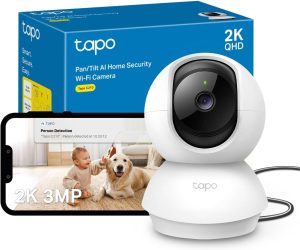
Pan & Tilt feature is a strong point. It covers the entire room, which is not always the case with competitors.
Human and Animal Detection by AI
The eufy Security Indoor Cam 2K uses cutting-edge technology. It distinguishes movements thanks to advanced algorithms. This allows knowing whether it’s a human or an animal moving.
How does smart detection work?
It relies on machine learning. The camera analyzes movements and behaviors. Over time, it becomes more accurate.
It classifies movements into different categories. This reduces false alerts and increases the relevance of notifications for the user.
AI accuracy and responsiveness
AI detection is very precise. In my tests, the camera reacted very quickly. It sent alerts instantly.
This speed is crucial for security. It allows prompt intervention in case of a problem. The
smart detection and
responsiveness make the user experience very reassuring.
Compatibility with Voice Assistants
The eufy Security Indoor Cam 2K is very compatible with voice assistants. This makes using the camera very easy. With
Amazon Alexa and
Google Assistant, managing my home security is simpler.
Integration with Amazon Alexa
Using the eufy Security Indoor Cam 2K with
Amazon Alexa is easy. I can ask Alexa to show the live feed on my screen. This makes monitoring my environment effortless.
Use with Google Assistant
With
Google Assistant, monitoring is even simpler. I can ask for info about my camera or check areas of the house.
Google Assistant responds quickly, making security management easier.
Camera installation and setup
Installing the eufy Security Indoor Cam 2K was straightforward. I followed a few simple steps to complete this
camera installation without problems. Here is how I did it.
Steps for an easy installation
The first step was to remove the camera housing. Then, I plugged the camera into a power outlet. I downloaded the eufy Security app on my smartphone to quickly sync the camera. The next steps guided me through setup:
- Create a eufy account or log in.
- Add the camera by scanning the QR code displayed on the app screen.
- Connect the camera to my Wi-Fi network.
- Position the camera in the ideal spot in my home.
Tips for optimal setup
For effective use of my camera, I found these
tips helpful for the
camera setup:
- Ensure you have a stable Wi-Fi signal where the camera is placed.
- Customize notification settings according to your needs.
- Test livestream features to confirm everything works as expected.
Following these recommendations makes the camera even more effective. It meets my expectations for home security.
Storage and Required microSD Card
To fully enjoy the eufy Security Indoor Cam 2K, storage must be considered. Good storage allows keeping all recordings for
continuous monitoring. The microSD card is essential in this setup. I will look at the available options and their importance.
Available storage options
The eufy Security Indoor Cam 2K offers several storage choices. Everyone can find the best option according to their needs. Here are the main options:
- Local storage via microSD card, ideal for continuous recording.
- Cloud storage, to manage videos remotely.
- Support for other storage devices, like NAS, for more access.
Importance of microSD card for continuous monitoring
The microSD card is crucial for uninterrupted monitoring. Without it, recordings may be limited or nonexistent. With the microSD card, I can record and keep real-time events. This allows me to review recordings whenever I want for detailed analysis.
In conclusion, choosing the right storage is essential to get the most from the eufy Security Indoor Cam 2K. A good capacity microSD card is necessary not to miss any important event.
Advantages and Disadvantages of the eufy Security Indoor Cam 2K
Before choosing the eufy Security Indoor Cam 2K, it’s important to weigh its
advantages and disadvantages. This camera offers several advantages making it interesting, but there are also points to consider.
Camera strengths
- 2K image quality: Captures precise details, useful for monitoring.
- Smart detection: AI technology efficiently detects movements, avoiding unnecessary alerts.
- Easy installation: Simple to set up, even for beginners.
Limitations to consider before purchase
- Accessory compatibility: A microSD card is needed to store videos, which may be an issue.
- Internet dependency: A good Wi-Fi network is crucial for full functionality.
- Night vision limitations: Although good, night vision might not meet all expectations.
Price and Value for Money
Comparing the price of the eufy Security Indoor Cam 2K with its features is interesting. The price may seem high, but you need to see what it offers. Before judging, examine carefully what it provides.
Price analysis versus features
The eufy Security Indoor Cam 2K has top image quality and advanced functions. It offers 2K resolution,
smart motion detection, and integrates easily with voice assistants. These advantages justify its price, making it a good buy for those wanting quality security.
Comparison with similar models
Compared to others, the eufy Security Indoor Cam 2K is very competitive. Many cameras have similar specs, but few reach eufy’s performance level at the same price. This shows that eufy offers good
value for money. It’s an excellent choice for those looking to invest in security.
Conclusion
To conclude, here is a summary of the key points about the eufy Security Indoor Cam 2K. We’ve seen its
2K image quality and ability to detect humans and animals. These make it ideal for improving your home security.
My
review of the eufy Security Indoor Cam 2K is very positive. It’s easy to install and compatible with voice assistants. With its microSD card, it monitors continuously. I recommend it to strengthen your home’s security.Choosing a
security camera depends on your needs. Think about what you want before deciding. But the eufy Security Indoor Cam 2K will likely meet your expectations. It will bring you the peace of mind you seek.